
On this page
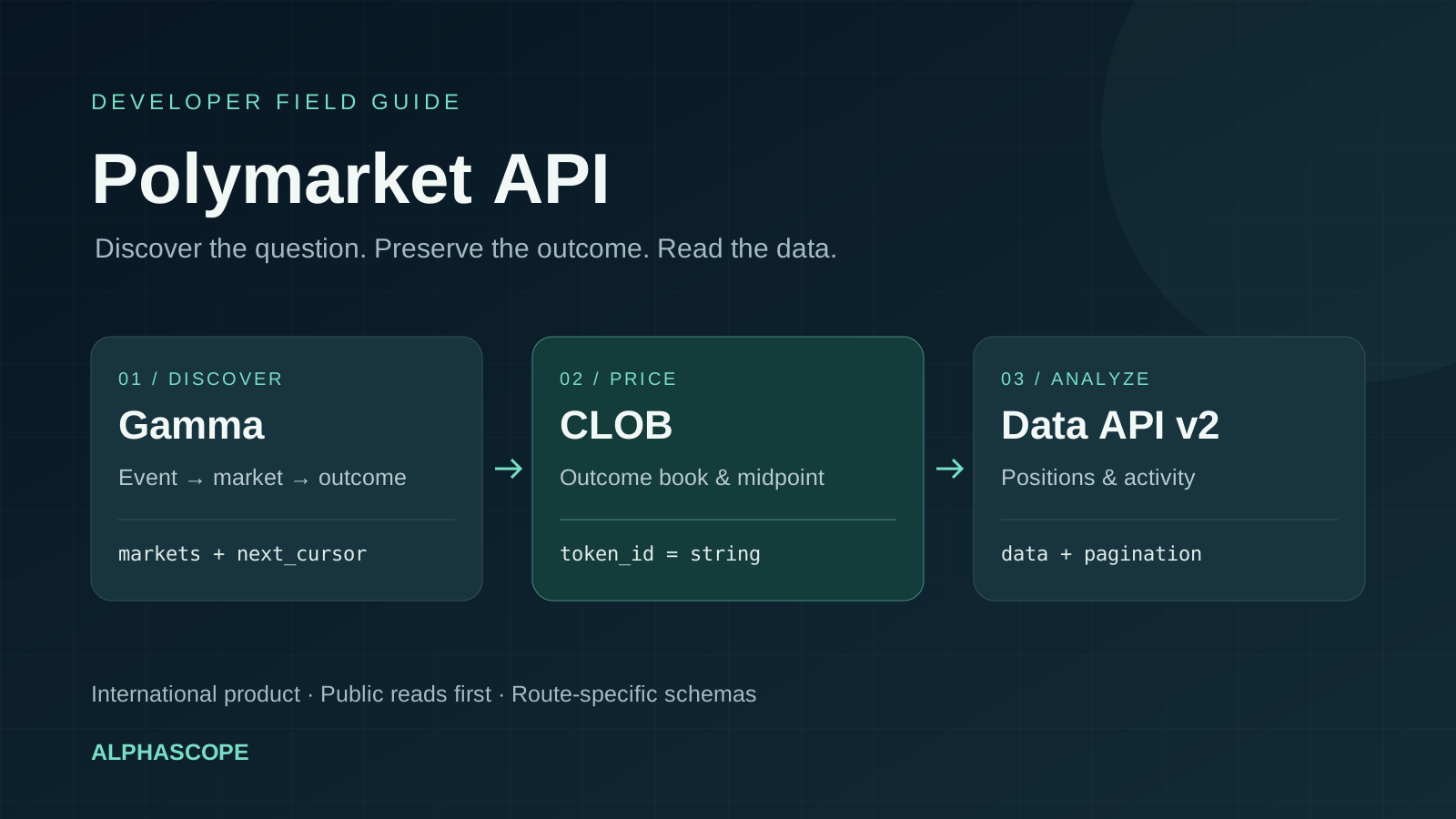
Yes, Polymarket has APIs. For an international market-data integration, begin with public discovery, select the exact market and outcome, then request the price or order book for that outcome. You do not need trading credentials for the public example below.
Checked October 6, 2026. This guide covers the international product documented at docs.polymarket.com. Polymarket US has separate documentation; do not reuse international hosts or authentication assumptions for a US integration.
Which Polymarket API should you use?
| Your task | Starting point | Identifier to preserve |
|---|---|---|
| Discover events and questions | Gamma API: gamma-api.polymarket.com | Event and market IDs, slug, condition ID |
| Read an outcome's order book or midpoint | CLOB API: clob.polymarket.com | Outcome token ID |
| Analyze positions, activity or portfolio data | Data API: data-api.polymarket.com | Route-specific wallet and condition identifiers |
| Stream updates | Official real-time-data workflow | Subscribed outcome IDs and local update times |
| Place orders or manage an account | Authenticated trading workflow | Signer, account wallet and compatible credentials |
Choose an API by the question your application needs to answer. A market list is a discovery result; it is not a complete order book or evidence that every listed question currently accepts orders. The official market-data overview explains the event → market → outcome workflow.
Start with a public Gamma API request
This request retrieves a small page of non-closed markets without an API key. We executed it on October 6 and received two market records and a continuation cursor. The particular markets returned can change.
curl -fsSL 'https://gamma-api.polymarket.com/markets/keyset?closed=false&limit=2'The keyset endpoint returns a markets array. If it returns next_cursor, pass that opaque value as after_cursor on the next request. Do not increment an offset: this endpoint explicitly rejects offset. Its documented maximum page size is 100.
Keep the continuation cursor separate from market identifiers. Stop when no continuation remains, and impose a deliberate page limit for an exploratory script. One page cannot justify a claim about the entire venue's market count.
Map the exact outcome before reading a price
One event can contain multiple market questions. Each market has distinct outcome identifiers. Save the question, slug, condition ID, selected outcome label and matching token ID together. Do not use an event ID, slug or condition ID in a parameter that requires an outcome token.
In our sampled Gamma response, outcomes and clobTokenIds were JSON-encoded strings. Decode both, verify their lengths match, and pair corresponding positions. Preserve token IDs as strings: converting these large identifiers to JavaScript numbers can lose digits.
const outcomes = JSON.parse(market.outcomes);
const tokenIds = JSON.parse(market.clobTokenIds);
if (!Array.isArray(outcomes) || !Array.isArray(tokenIds) ||
    outcomes.length !== tokenIds.length) {
  throw new Error("Outcome mapping is incomplete");
}
const outcomeTokens = outcomes.map((outcome, i) => ({
  outcome,
  tokenId: tokenIds[i],
}));
This snippet illustrates the response shape we observed, rather than a universal parser for every SDK or API version. Validate the fields at your integration boundary. Recheck the market's status, order acceptance and governing rules before interpreting it as a tradable contract.
CLOB prices: midpoint is different from an executable fill
The official pricing guide documents a public midpoint request. Supply the outcome token ID you selected:
curl -fsSL --get 'https://clob.polymarket.com/midpoint' \
  --data-urlencode 'token_id=YOUR_OUTCOME_TOKEN_ID'
Replace the placeholder before running it. The midpoint is the average of the best bid and best ask. It is a reference, not a promise that your requested quantity will fill at that price. Inspect the appropriate book side, available size and fees when evaluating execution.
For a worked explanation, read our prediction-market slippage guide. For sampled price history and CSV export, use the historical-data viewer and its data guide. A historical chart does not establish current order-book depth or a resolved outcome.
How do you get a Polymarket API key?
First decide whether you need one. Public discovery and market-data reads can use an unauthenticated client. Authenticated CLOB access uses a wallet-ownership signature to create or derive credentials containing an API key, secret and passphrase. Builder credentials serve a different integration role.
Follow the current wallets and authentication guide for your account wallet and signer. Preserve that relationship when reconnecting. Do not assume a copied key alone replaces the required wallet setup or signing flow. Keep secrets and private keys out of client bundles, public repositories and request logs.
This article's requests are public reads. They do not create credentials, deploy a wallet, grant token approvals or submit orders. A working market-data request verifies data access; it does not verify an authenticated trading integration.
Python and TypeScript: use the current SDK documentation
Polymarket now documents unified clients. The TypeScript package is @polymarket/client; the Python package is polymarket-client. The SDK migration guide distinguishes public clients from secure clients and maps older capabilities to current methods.
For a new read-only project, start with the public-client examples. For an existing project, record its installed version and migrate one workflow at a time. An older tutorial's import name or method can be incompatible with a current SDK even if the underlying REST service still works. The raw public request above avoids requiring an SDK installation for your first check.
Data API v2: the announced October 24 migration
The official migration guide states that Data API v1 retires October 24, 2026. Both versions use the Data API host, with current v2 routes under /v2. Check the notice again before planning a release.
| Migration issue | What your parser must handle |
|---|---|
| Response structure | Payload in data; paginated responses also include pagination |
| Pagination | Follow pagination.next_cursor rather than calculating offsets |
| Field names | Response fields use snake_case |
| Positions | /v2/positions uses lifecycle status filters |
| Documented misses | Handle data: null and empty lists as valid empty results |
The notice exempts /v1/accounting/snapshot from that retirement. Do not mechanically prepend /v2 to every URL or assume Gamma keyset and Data API pagination have identical envelopes. Test each route against its own documented schema.
API pricing, rate limits and reliable collection
The public discovery example above worked without a paid API credential. That does not establish unlimited capacity or an all-purpose pricing policy. Check current program terms and the endpoint documentation for the integration you intend to run. Trading fees are a separate cost; see our Polymarket fees guide.
The rate-limit reference describes IP-based Cloudflare limits with sliding windows and throttling. CLOB order and cancellation requests also have separate signer limits. Size your collection around the relevant endpoint, rather than applying one requests-per-second number to everything.
- Set a timeout and bounded retry policy; record failed requests instead of replacing them with sample data.
- Cache stable metadata and fetch changing prices at the cadence your use case needs.
- Preserve collection times and exact outcome IDs so a stale quote cannot masquerade as a live one.
- Handle empty results, schema changes and incomplete pages explicitly.
- On stream reconnects, rebuild the required snapshot before treating local state as current.
Use the Kalshi API guide for the other venue's workflow. Compare compatible contracts and product access in our platform comparison; similarly worded titles alone are insufficient for a data join.