
Local JSON inspector
Find the best bid and ask
Paste one REST order-book response. This tool reads only bids and asks, ignores zero-size levels and searches all prices. It runs in your browser without sending the pasted JSON. Decimal values use approximate JavaScript arithmetic; this is an inspection aid, not an order validator or live quote.
- Best bid
- 0.4100
- Best ask
- 0.4500
- Spread
- 0.0400
- Midpoint
- 0.4300
Two-sided snapshot. Not an execution guarantee. Positive-size levels: 2 bids / 2 asks.
On this page
The Polymarket order book API gives you a snapshot of resting orders for an outcome. A useful integration keeps that snapshot separate from a model forecast, the last trade, and a quote you could execute for a particular size. This developer guide includes a local JSON inspector and a small read-only request example.
Documentation reviewed October 13, 2026. The linked examples describe Polymarket’s international API; do not silently apply them to the separate US product. For a trader-oriented introduction, use our order-book reading guide.
Start with the outcome identity
The official price and book documentation distinguishes CTF token IDs from Protocol V2 position IDs. Unified SDK methods use the outcome’s asset ID. The documented REST request uses /book?token_id=.... Preserve the identifier as a string; converting a long identifier to a JavaScript number can lose precision.
Our suggested integration record includes the event question, selected outcome, identifier, retrieval time and source URL. This is an original audit convention, not a required venue schema. An identifier without a human-readable outcome makes a later comparison unnecessarily difficult to review.
Make a read-only request
curl --fail --max-time 15 --get https://clob.polymarket.com/book \
  --data-urlencode 'token_id=YOUR_OUTCOME_ID'
Replace the placeholder with the specific outcome identifier. Download a Python read-only example with timeout and response-shape checks. It performs one GET, prints a JSON snapshot, and does not sign or submit orders.
Design failures as visible states. An HTTP error, an empty side, an invalid payload and a missing identifier should not all become a displayed zero. Zero is a price or estimate; “unavailable” is a data-quality observation. Preserve enough error context to investigate without recording private account credentials.
Inspect levels without assuming array order
The official documentation describes bids ascending and asks descending, putting each best price at the end. The inspector above searches for the maximum positive-size bid and minimum positive-size ask instead of relying on element position. This also makes pasted, reordered fixtures inspectable.
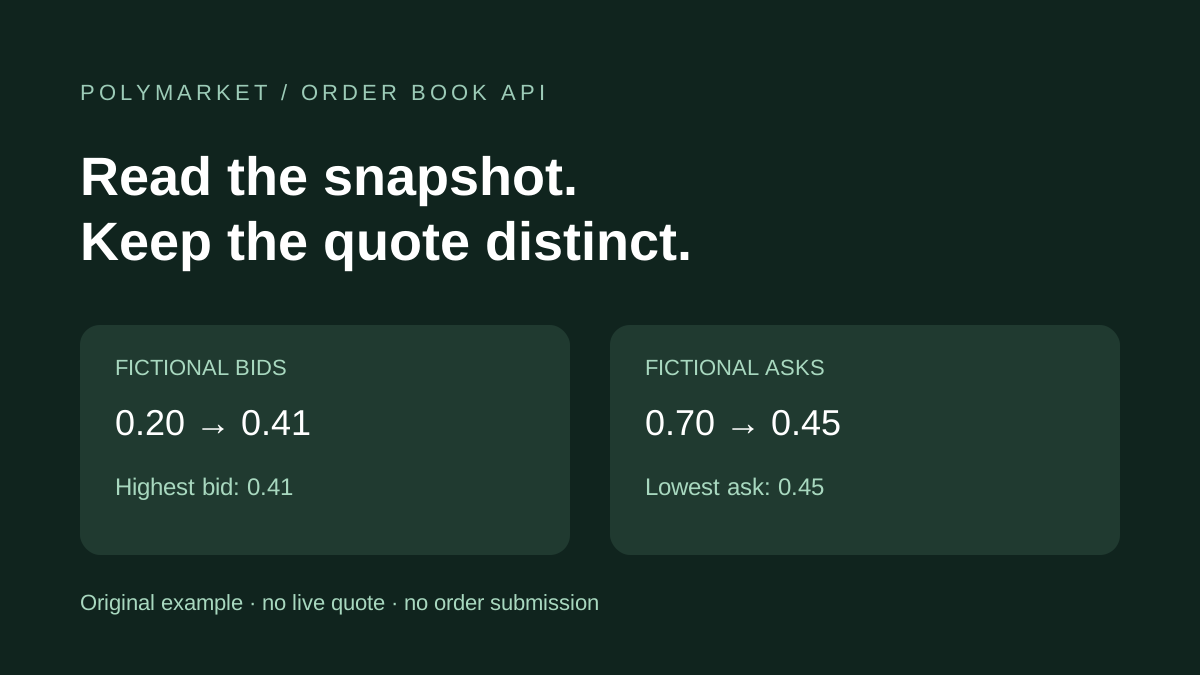
Our fictional example has bids at 0.20 and 0.41, and asks at 0.70 and 0.45. The best bid is 0.41, the best ask 0.45, the spread 0.04 and midpoint 0.43. Reading the first entries would produce the wrong answer. These invented values do not describe a live contract.
Keep quote types distinct
The same official reference describes BUY price as the lowest ask and SELL price as the highest bid. A midpoint averages those two prices; it is not itself a resting order. Snapshot metadata can include a timestamp, hash, tick size and minimum order size.
| Observation | What our application should record |
|---|---|
| Model forecast | Estimated probability, outcome, model/version and forecast time |
| Book snapshot | Outcome identifier, levels and retrieval/source time |
| Last trade | Trade price and trade time, when available |
| Executable quote | Side, size, price, fees and confirmation at execution |
For an original hypothetical, a model estimate of 0.60 and an ask of 0.45 are two different observations. The apparent difference is not proof of an available trade: compare the same outcome and cutoff, and investigate costs and whether the ask remains available.
Empty, locked and crossed snapshots
Try removing every ask in the inspector. The bid remains visible, but spread and midpoint become unavailable. Set the best ask equal to the best bid for a locked example. Move it below the bid for a crossed example: the tool flags the inconsistency and suppresses midpoint. It does not invent missing liquidity or repair source data.
Sizes and prices must be nonnegative decimal strings, with price between zero and one. The inspector skips zero-size levels and rejects malformed fields. It intentionally uses approximate arithmetic and does not validate tick increments, order minimums, balances or venue rules.
A timestamp is evidence with a scope
Record when you retrieved a payload separately from any timestamp inside it. A successful request does not promise that a level will remain available afterward. A changed hash can identify a changed snapshot; it is not a forecast update or a guarantee of execution.
Our slippage calculator explores hypothetical depth and size. Before building an execution workflow, inspect the venue’s current rules and required precision separately. This guide and inspector are for public-data research.
Connect the snapshot to research
Alphascope’s market discovery pages expose AI forecast context. Those estimates are not a replacement for the venue book. Keep the forecast, outcome definition and quote record together when reviewing a discrepancy. Our CLARITY Act guide demonstrates why similar headlines can still describe different milestones.